Build a compliance program from the documents you already have, with review and approval before anything is written.
Sage is moving closer to the work.
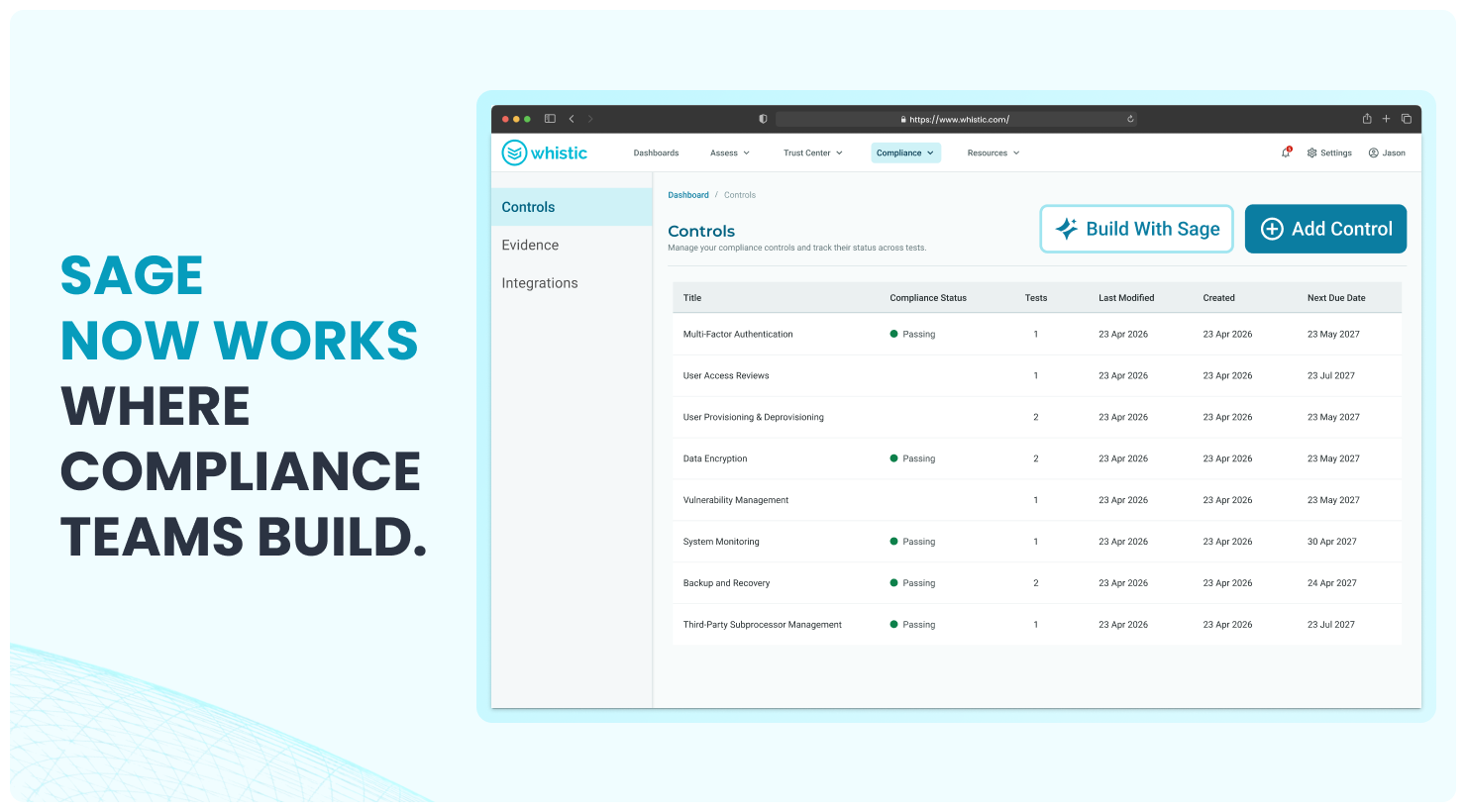
Whistic's Sage AI assistant already lived in the platform, available in places like Resources for analytics and Q&A. Now Sage is on the Compliance Controls page itself: an AI compliance assistant that is context-aware about the page, the files you upload, and the program you are building.
That changes the starting point for compliance teams.
Instead of opening an empty controls library and re-entering work that already exists somewhere else, you can upload a SOC 2 export, a controls spreadsheet, a policy document, or an export from a prior GRC tool. Sage reads the file, drafts controls and tests, shows you a preview, and asks for approval before anything is written to Whistic.
The goal is simple: turn the manual compliance build into a reviewable workflow.
The work already exists. It just needs to become usable.
Most compliance programs do not begin from scratch. The controls are already described in a SOC 2 report. The tests are sitting in a spreadsheet. The framework mappings are buried in a legacy export. The policies are in Word docs and PDFs.
The hard part is getting that work into the system where it can be tested, evidenced, reviewed, and maintained.
That gap is where compliance teams lose time. Re-keying controls. Rebuilding tests. Cleaning up copy-paste errors. Trying to remember which version of a spreadsheet is current. Staring at a blank controls page when the audit clock is already running.
Sage is designed to close that gap.
It does not replace the compliance team. It removes repetitive setup work so the team can spend more time on review, coverage, and the calls that require judgment.
How Sage works
The workflow is direct, and reviewable at every step.
- Upload your source document. Start with a SOC 2 export, a controls spreadsheet, a policy document, or a file exported from a prior GRC tool. Supported formats include CSV, PDF, DOCX, and XLSX.
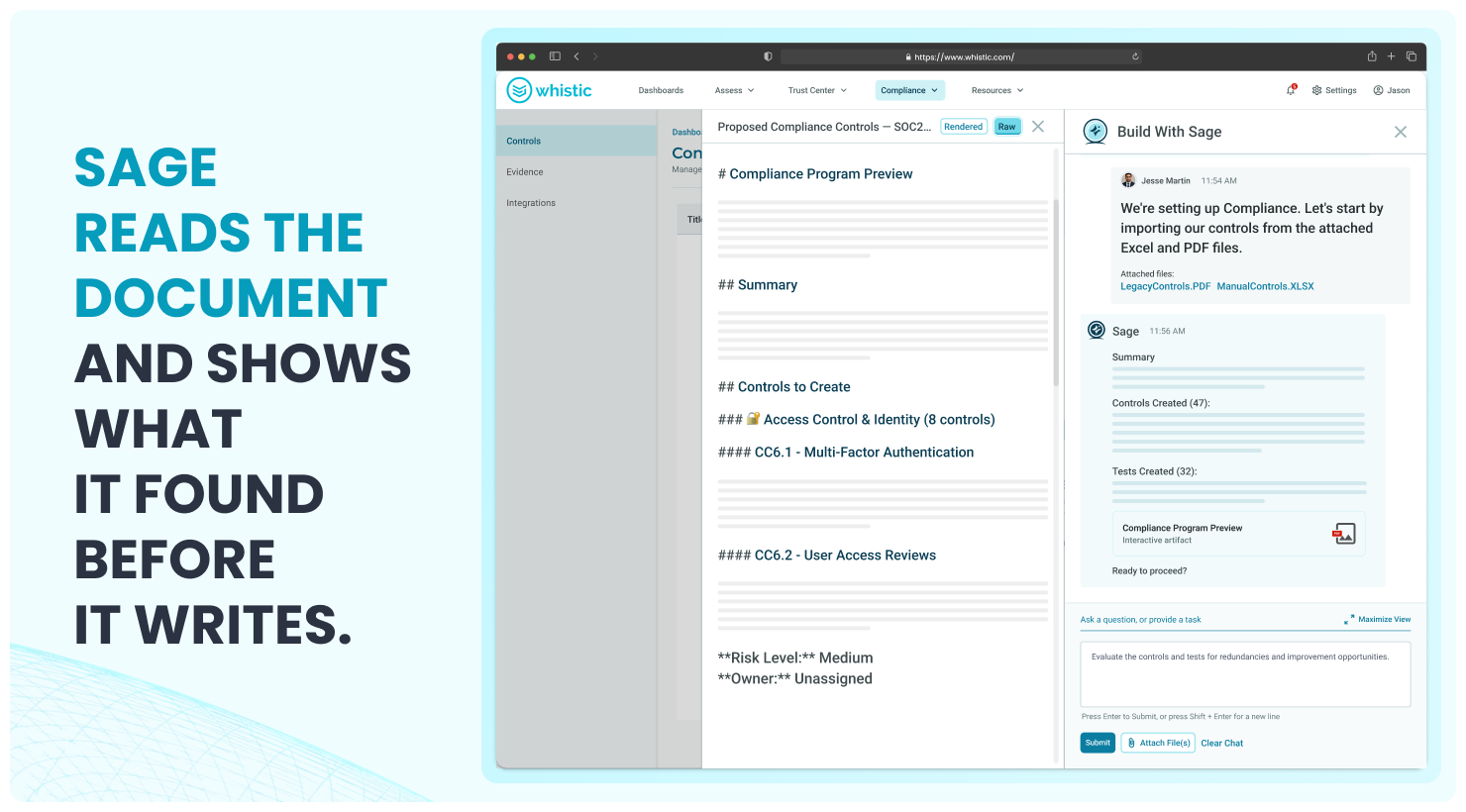
- Sage reads the file. Sage parses the document and outlines what it found, including controls, tests, and framework mappings when those mappings are present in the source.
- Sage drafts the program. Sage creates a structured preview of the controls and tests it can generate from the uploaded file.
- You review the preview. Nothing is written to the platform yet. The draft appears in the side panel so you can inspect what Sage is proposing.
- Sage asks for permission. You approve before anything is created. You can also reject the draft or keep working manually.
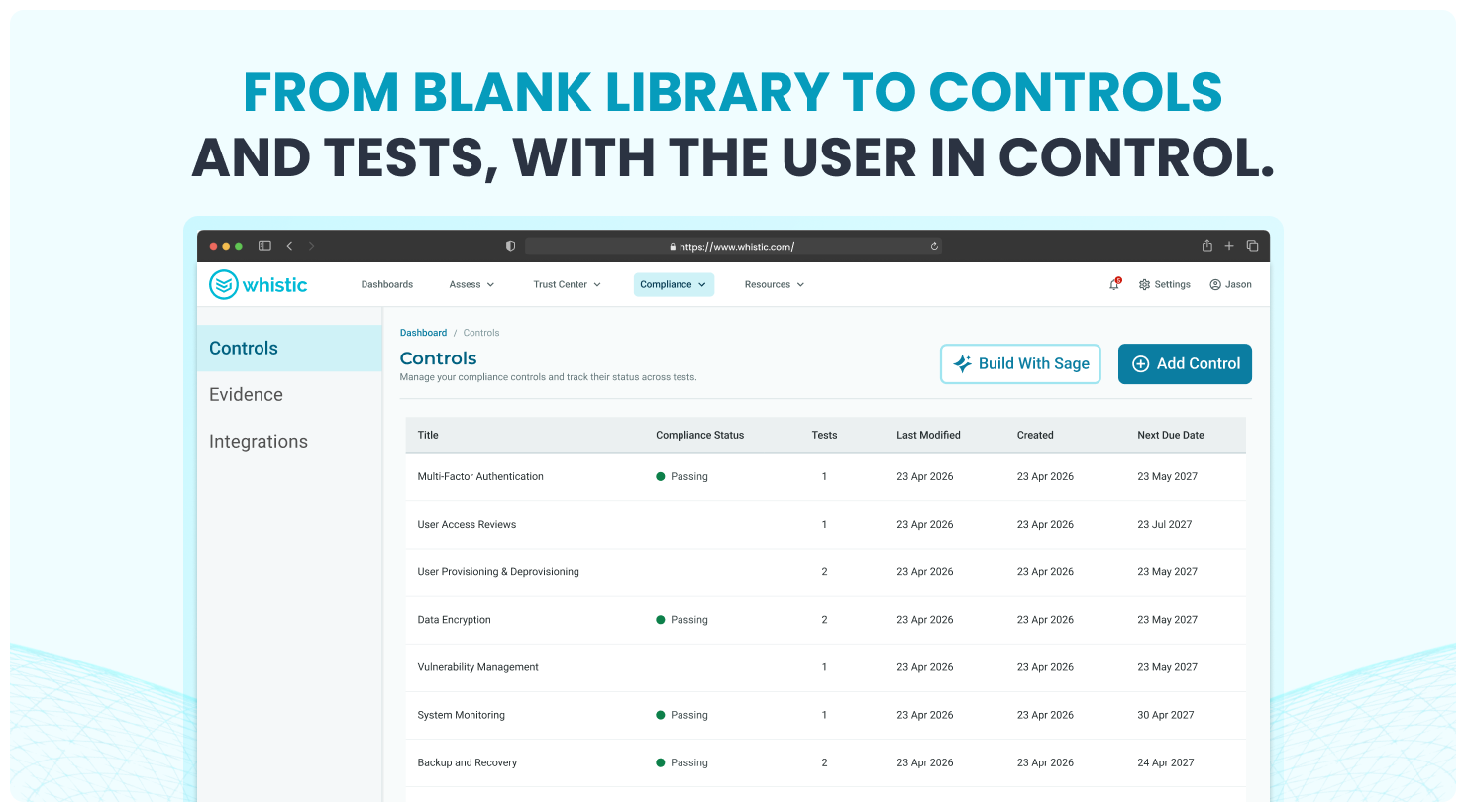
- Controls and tests go live. After approval, the controls and tests appear in your Compliance library, ready for control testing and evidence collection.
In one example workflow using a SOC 2 CSV export, Sage created 47 controls and 32 tests in under 15 minutes. Actual timing will depend on the size and structure of the source document, but the shift is the same: hours of data entry become minutes of review.
Built for review, not blind automation
Compliance teams do not need AI that guesses. They need AI that shows its work.
That is why Sage on Compliance is built around review and permission. The assistant can read, draft, and prepare the work, but the user decides what gets written. Manual control creation remains fully supported. Sage is additive, not mandatory.
That distinction matters because compliance work has to be defensible. A control library is not just a list. It becomes the foundation for testing, evidence collection, auditor review, internal controls, and accountability.
Sage helps create the first draft faster. Your team still owns the program.
Accuracy starts with source faithfulness
When AI is used in compliance, the important question is not simply whether it can produce an answer. The better question is whether the answer is faithful to the source documents.
Whistic AI is measured against source faithfulness, not guesswork. In the 2026 benchmark, Whistic AI delivered high levels of accuracy with every answer reviewed against the underlying source documents.
The discipline behind that number is what matters most. When Whistic AI is unsure, it says so. When confidence is low, the score reflects it. When the answer is not in the documents, the system marks it unknown rather than guessing.
That is how AI becomes useful in compliance: not by sounding confident, but by making the evidence reviewable.
Sage is one surface of Whistic AI
Sage on Compliance is not a standalone AI feature bolted onto the product. It is the newest surface of Whistic AI across the platform.
The same broader AI foundation already supports work across vendor risk, security review, and internal controls, including:
Vendor Summary. Reads vendor documentation, maps it against your controls, and surfaces items that need review.
SOC 2 Summary. Summarizes SOC 2 reports against your control framework, including findings, deviations, and complementary controls.
Smart Search. Answers natural-language questions against your knowledge base or vendor documentation.
Smart Response. Drafts questionnaire responses from approved evidence.
Vendor Insights. Asks a question across a vendor population or targeted segment, then helps teams take follow-up action.
Trust Center Capture. Reads uploaded documents to draft controls and tests, providing a preview for review before implementation.
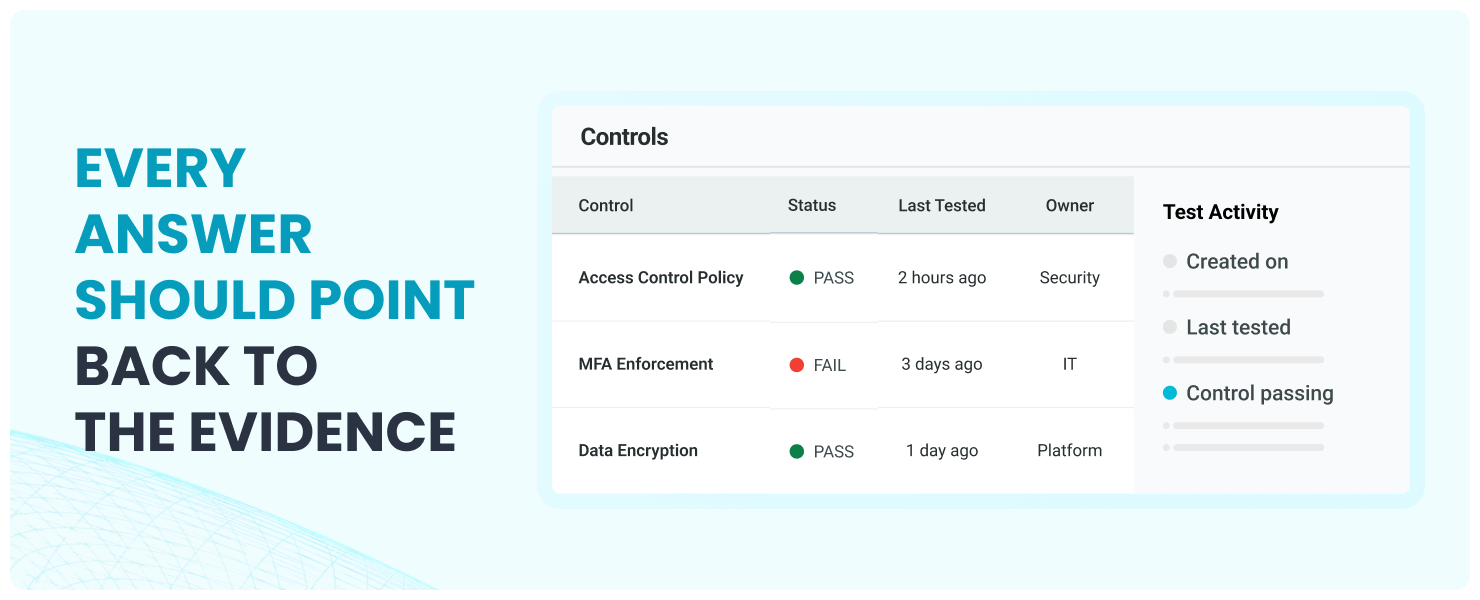
Across these workflows, Whistic AI is designed to show its work with a confidence score, a source citation, an answer explanation, and a relevance ranking. The point is not to ask teams to trust a black box. The point is to help them review faster, with the evidence in front of them and an audit trail behind the work.
Why this matters for compliance, risk, and security leaders
Compliance teams are under pressure from both sides.
Internally, they need controls that are current, tested, and tied to evidence. Externally, customers, auditors, boards, and regulators want proof that the program is working, not just documentation that says it exists.
Sage on Compliance helps teams move faster at the point where many programs stall: setup.
For teams migrating from spreadsheets or a legacy GRC tool, Sage bridges existing documentation into Whistic. For teams standing up Compliance for the first time, it removes the blank-page problem. For mature programs, it lightens the administrative weight of structuring controls so reviewers can focus on quality, coverage, and gaps.
That is the larger shift Whistic is building toward.
Compliance should not be an annual scramble to assemble compliance evidence after the fact. It should be a living, audit-ready program where controls, tests, evidence, and decisions are captured as the work happens.
What comes next
Sage on Compliance is one step in a larger AI strategy.
Whistic is building the Agentic Risk Operations Platform: one foundation for vendor assessments, monitoring, compliance, and trust workflows. Whistic AI reads evidence, maps it to controls, surfaces what matters, and keeps the work reviewable.
The next layer is agentic assessment workflows.
Whistic is extending this same foundation into agents that can help initiate assessments, gather sources, run analysis, and prepare reporting. The goal is not to remove risk teams from the process. It is to remove repetitive process work so teams can focus on review, escalation, and decisions.
Agents do the work. Your team owns the decision.
Frequently asked questions
What is Sage on Compliance?
Sage is Whistic's AI assistant, now context-aware on the Compliance Controls page. It can read uploaded documents, draft controls and tests, show a preview, and write to the platform only after approval.
What file types does Sage support?
Supported formats include CSV, PDF, DOCX, and XLSX. Common starting points include SOC 2 exports, controls spreadsheets, policy documents, and exports from prior GRC tools.
Does Sage replace manual control creation?
No. Manual control creation remains fully supported. Sage is additive, designed to help teams move faster when they already have source documents to work from.
Does Sage write framework mappings directly into Whistic's framework registry?
Not in this release. Sage can read and preserve framework mapping information from uploaded documents, but direct write-through into Whistic's framework registry is on the roadmap.
What is the broader Whistic AI strategy?
Whistic AI powers work across vendor assessments, SOC 2 review, questionnaire response, smart search, vendor insights, and now Sage on Compliance. The broader platform direction is agentic risk operations: Automate the work. Own the decision.
Automate the work. Own the decision.
Sage on Compliance brings Whistic AI into the place where compliance teams build.
It reads the documents. Drafts the controls. Prepares the tests. Shows the work. Waits for approval.
Your team reviews, decides, and owns the program.
That is what compliance looks like inside the Agentic Risk Operations Platform.
Automate the work. Own the decision.
The Agentic Risk Operations Platform.
Built for the teams making the calls.